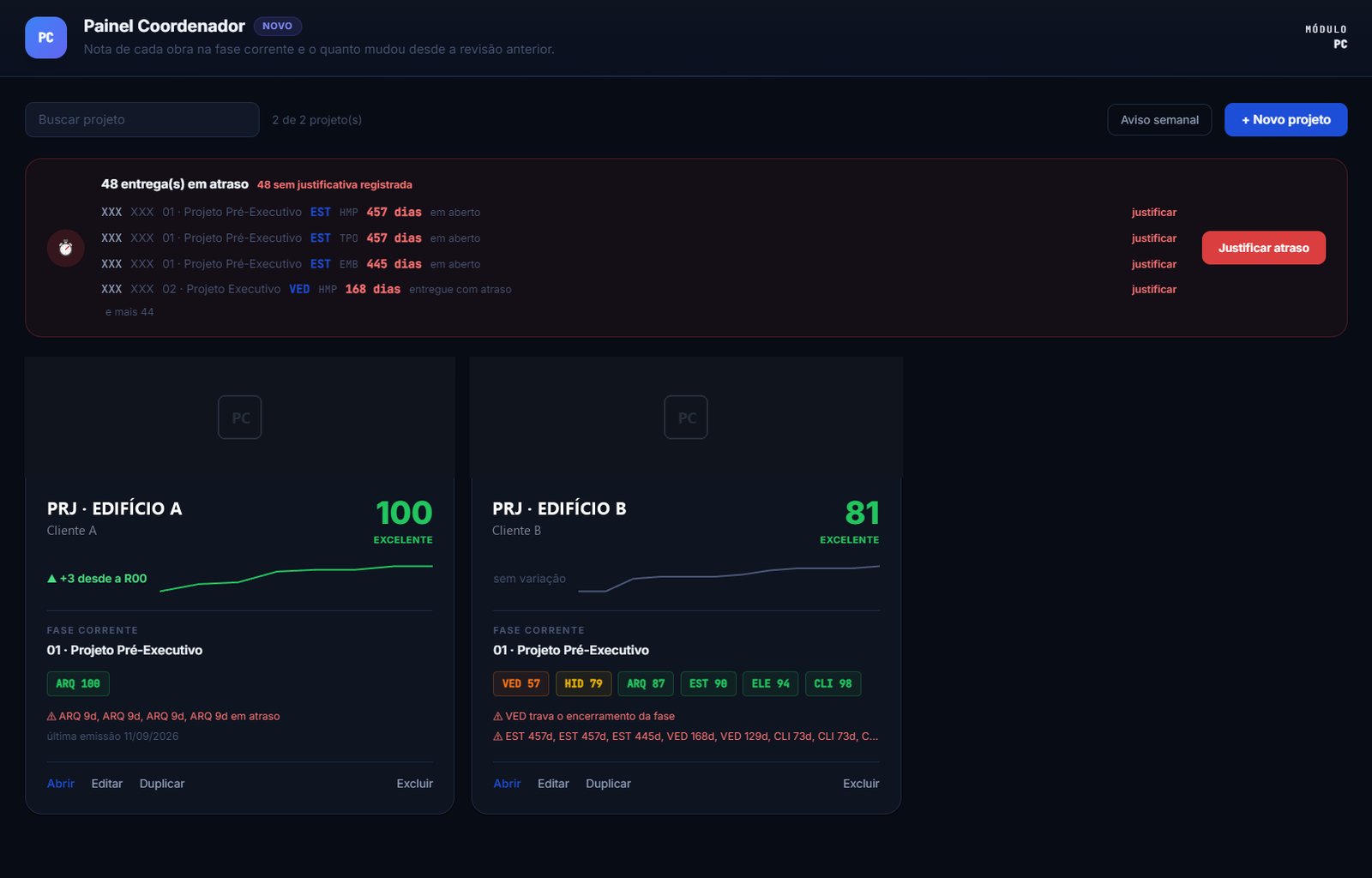
The Coordination Dashboard brings the whole project into one screen: a score per discipline and phase, deliveries against the schedule, the open items from your CDE, clashes round after round, and a view your client opens without logging in. Every IFC Checker run feeds those numbers on its own, so you catch the error before it reaches site.
The model leaves authoring approved. The site finds the clash. The schedule pays the bill.
Every BIM coordinator knows the sequence: the error that slips through becomes a last-minute revision, a rejected delivery and a schedule that slips by weeks. IFC Checker exists to break it: it finds, shows in 3D and fixes what is wrong in the IFC before the delivery leaves your office.
BIM coordination is demanded as evidence and defended with a spreadsheet. The Coordination Dashboard keeps each discipline score in each phase, measures punctuality by the CDE date, reads the open items from your coordination platform, tracks clashes round after round and publishes to the client exactly what you choose. Every IFC Checker run feeds those numbers by itself: you audit the model, the project documents itself.

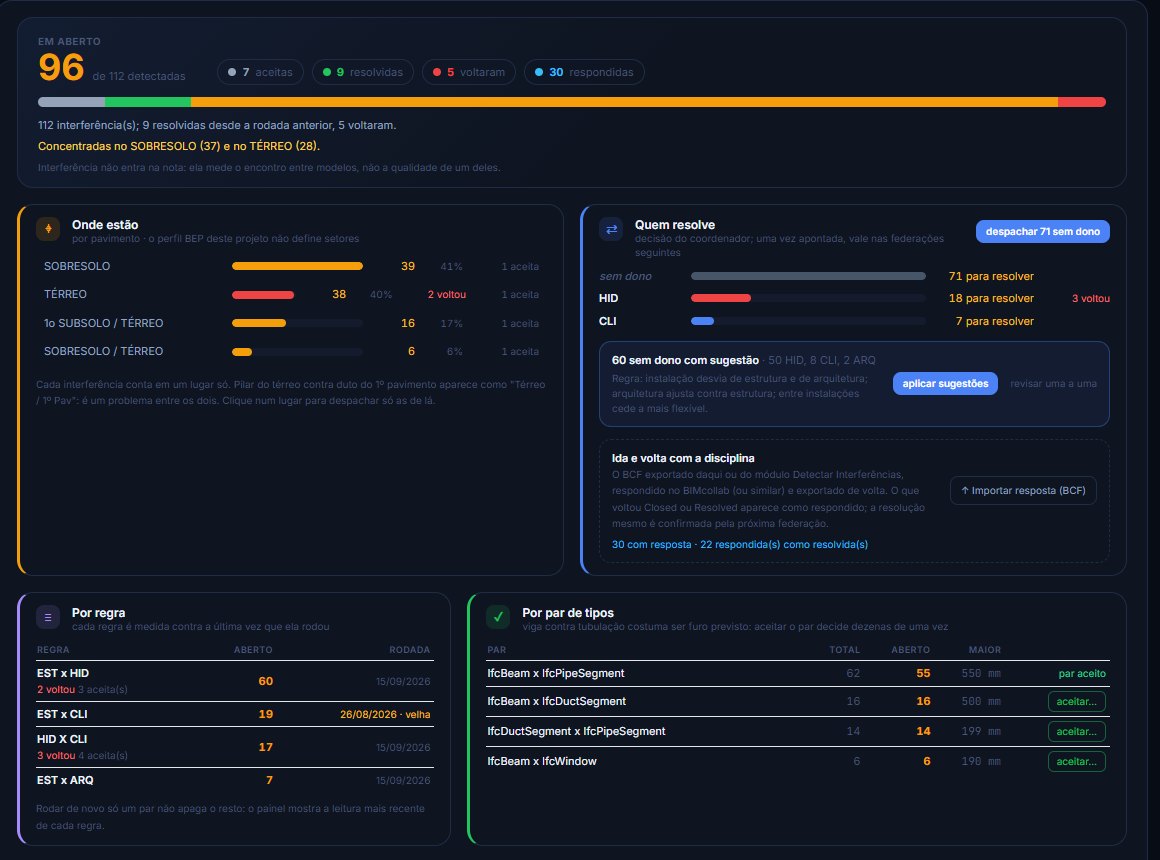
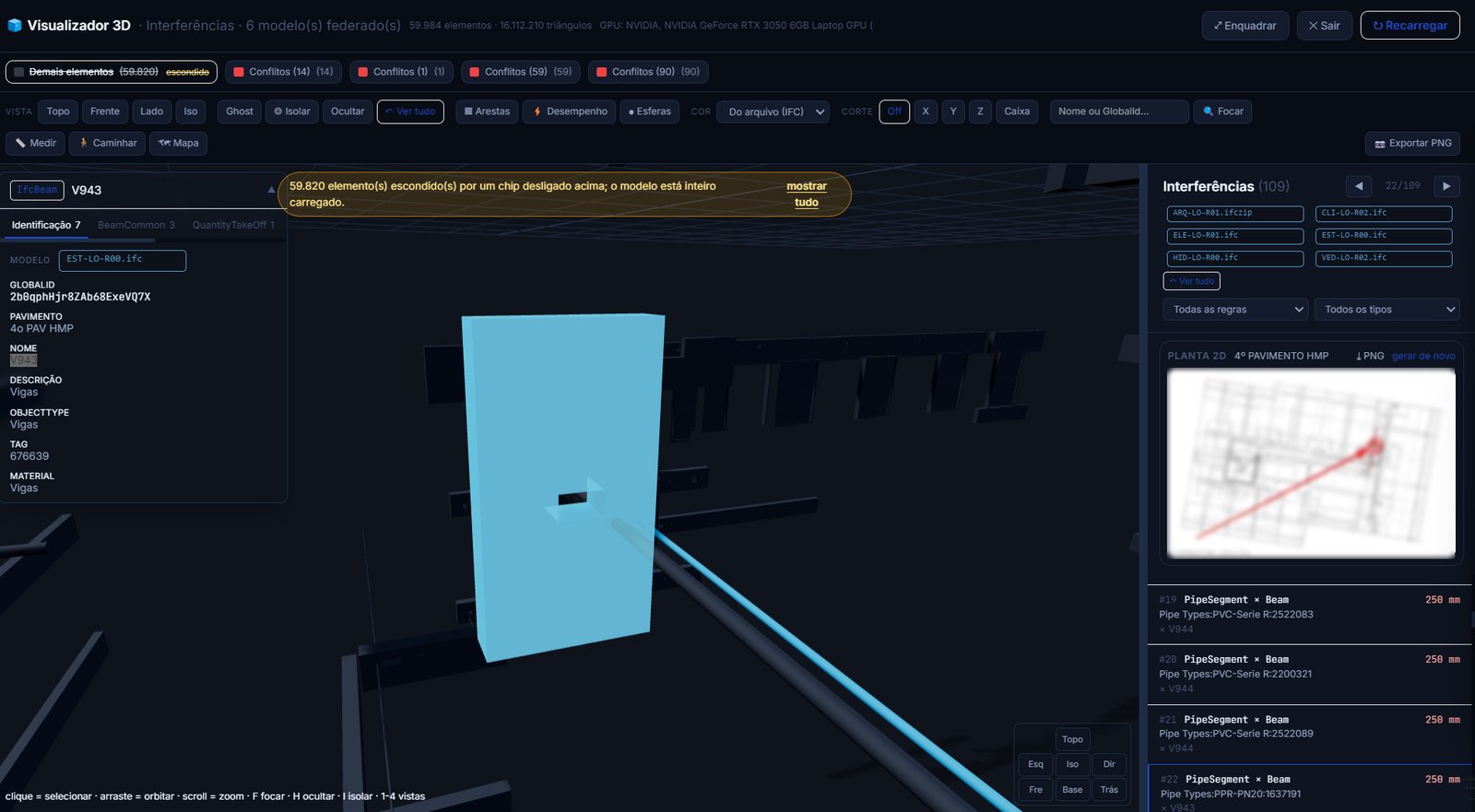
Each federation is a round recorded in the phase: detected, waived, resolved and the ones that came back, with the list of who resolves what. The dashboard says where they hurt, by zone and storey, and each clash keeps its identity even when GUIDs change between revisions, so the comparison between rounds does not lie. Export BCF per discipline, answer in BIMcollab or ACC and import it back: what closed there closes here.

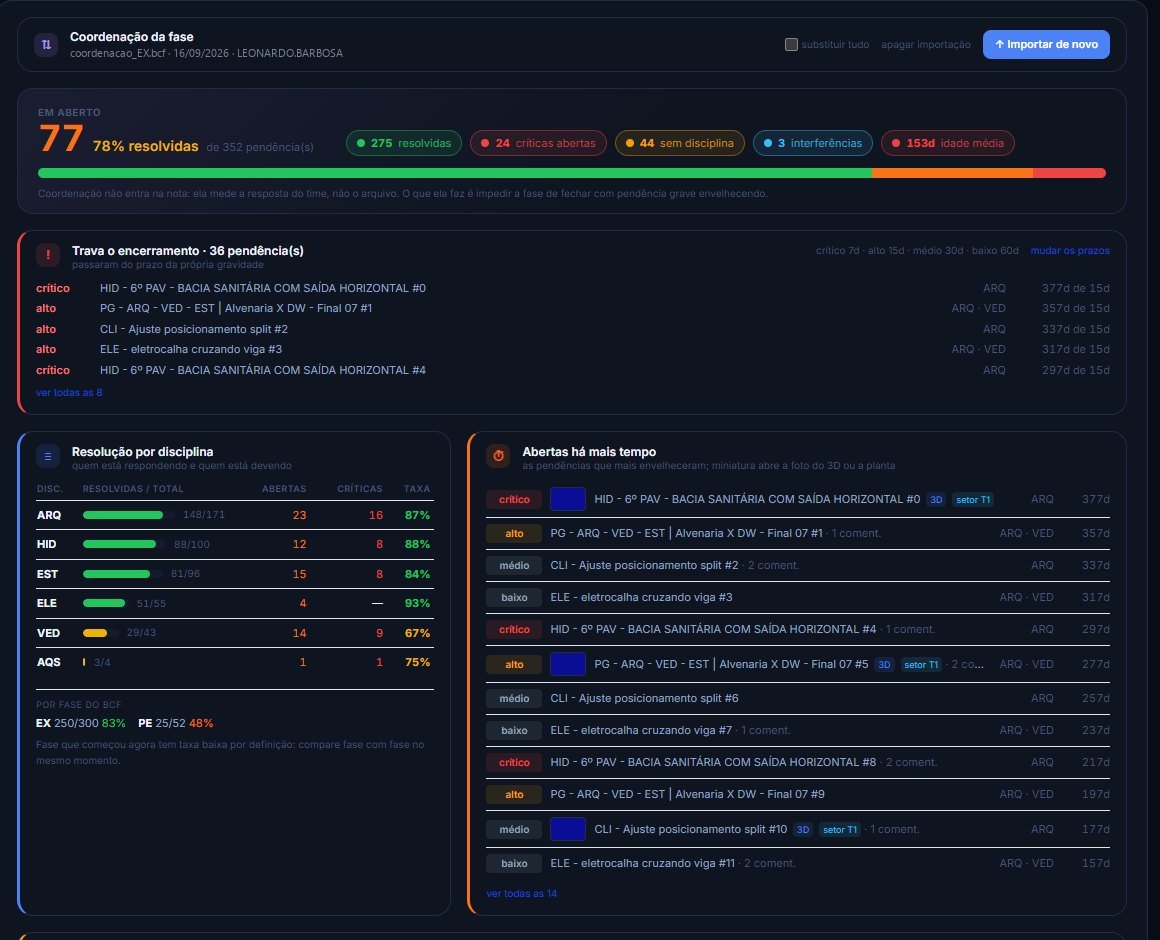
Import BCF from the platform the project already uses and every open item arrives with its discipline tag and age. The dashboard separates what is open and still within the deadline for its severity (work in progress) from what has blown past the deadline (that counts against you), closes the scoreboard per discipline (total, resolved, open, overdue) and names what is blocking phase closure. A critical item open beyond tolerance keeps the phase from closing, and the dashboard tells you which one.

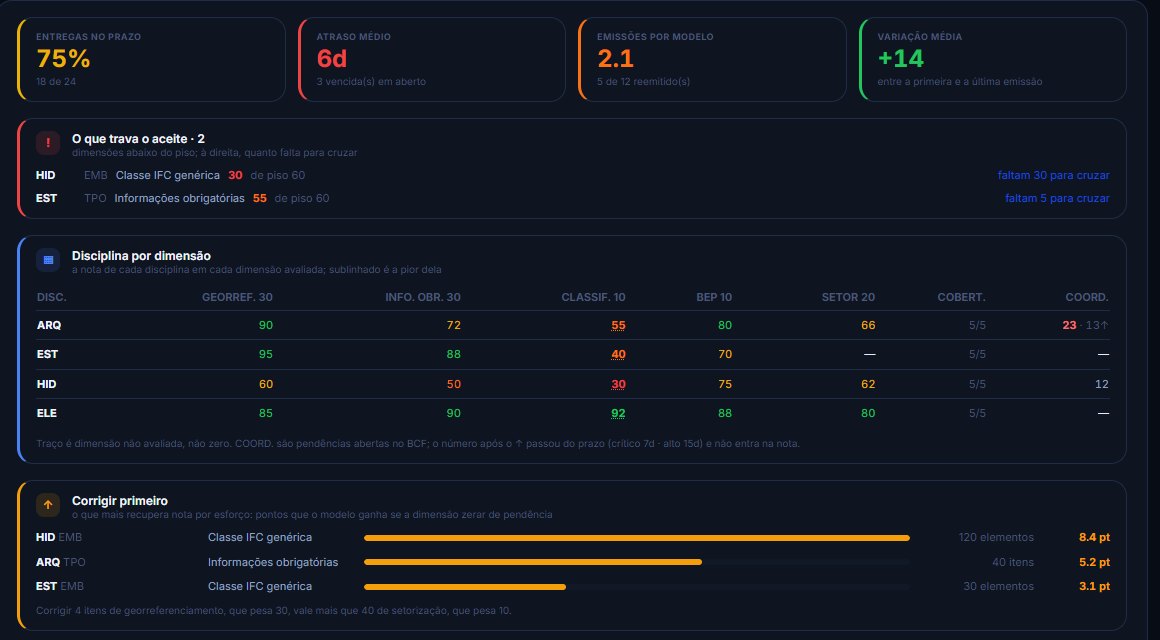
Each discipline score in every dimension assessed, what is blocking acceptance, and a queue of what recovers the most score per unit of effort. Recurrence (what had already been flagged) and issues per model expose the real rework.

Finding a clash in 3D is easy for whoever has the model open; for whoever has to fix it, it is not. Every markup and every clash comes out with the 2D floor plan of the storey and the element marked in red, plus the 3D snapshot and the assignee. It is what the designer opens on a phone, on site, with nothing installed, and what goes into the BCF you send.
Send the client the coordination you already do: a link with an expiry date and an optional PIN opens the project trajectory, the current phase, the deadlines and the federated 3D in the browser, with nothing to install. You choose what each link shows, and the IFC never leaves your hands: what travels is the mesh, not the file.
From pre-construction design to release for construction, each discipline carries a score per phase and, inside the phase, its evolution revision by revision (R00, R01…). Closing a phase freezes the score.
The date that counts is the CDE upload date. On-time deliveries, average delay, reschedules and open overdue items, per discipline.
Clashes and markups carry the federation zone (tower, podium) and the storey. Instead of "214 open", the dashboard says "141 on the roof level".
Nobody coordinating eight projects reads three numbers per project. Each one gets a colour and the reason behind it: an acceptance criterion blocking closure, a score falling since the previous issue, or a delivery overdue for too long.
A low score on one project is that project problem alone. The same discipline at the bottom of the list on four projects is a different conversation. The comparison puts your portfolio side by side and shows the designer who keeps repeating.
Real screenshots of the platform on real projects: Coordination Dashboard, model federation, clash detection, revision comparison and executive audit. Nothing here is a mockup.
These are the modules that feed the dashboard: each one solves a real problem in the model and, once it runs, becomes that discipline score in the phase. Auditing that fixes, not just flags. Wherever there is something to coordinate, there is BCF export: 9 modules produce topics ready for your platform.

Federate up to 10 models (architecture, structure, plumbing…) and define rules per discipline pair, with property filters. Every clash with its exact point, penetration in mm, navigable 3D and BCF per group.

Proxies grouped by family and coloured in 3D. One click and AI suggests the correct IFC class for each group, and the app fixes it straight in the file.

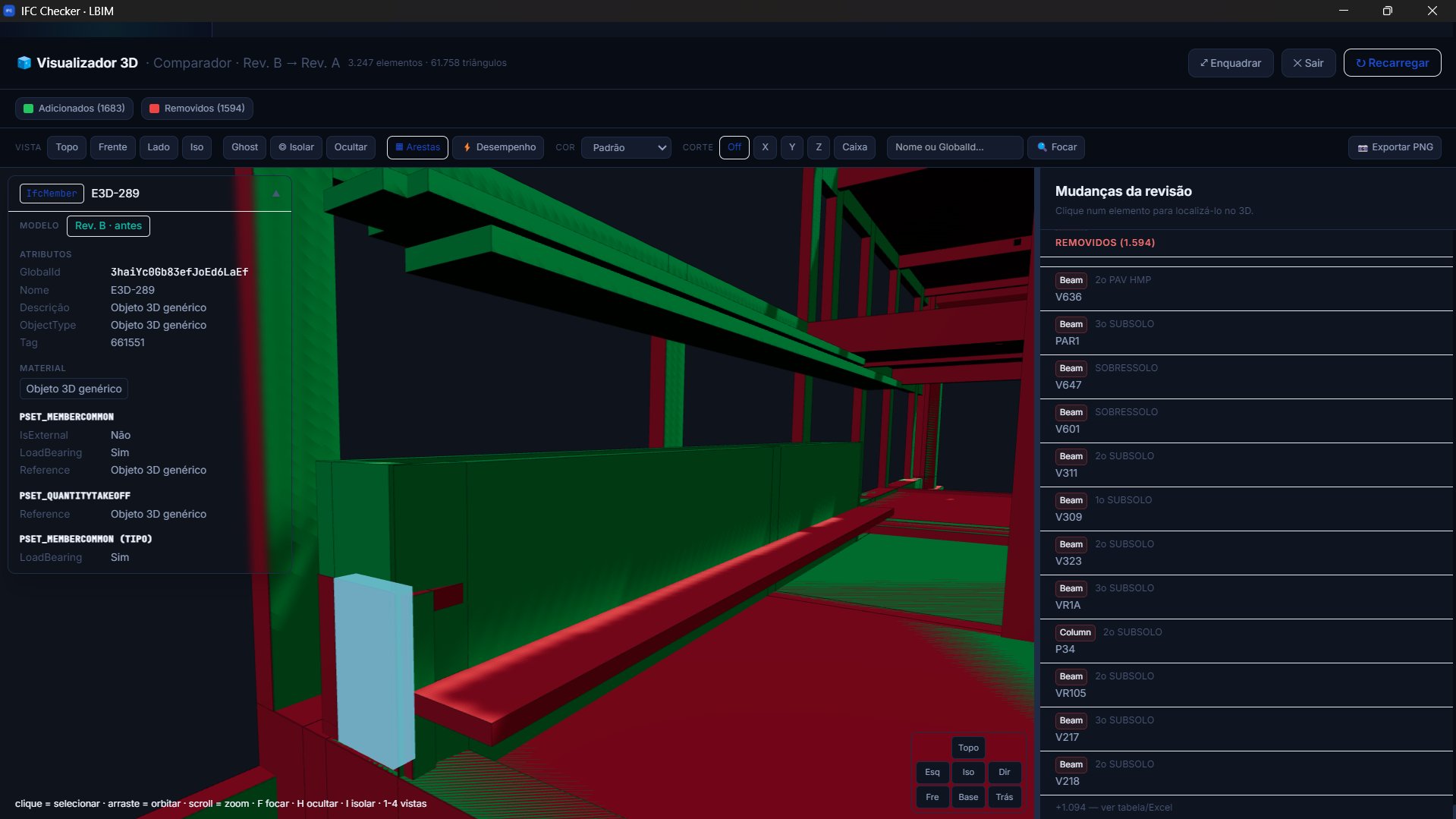
Added in green, removed in red. GUID diff with rename detection, georeferencing shift and an AI-written technical report.

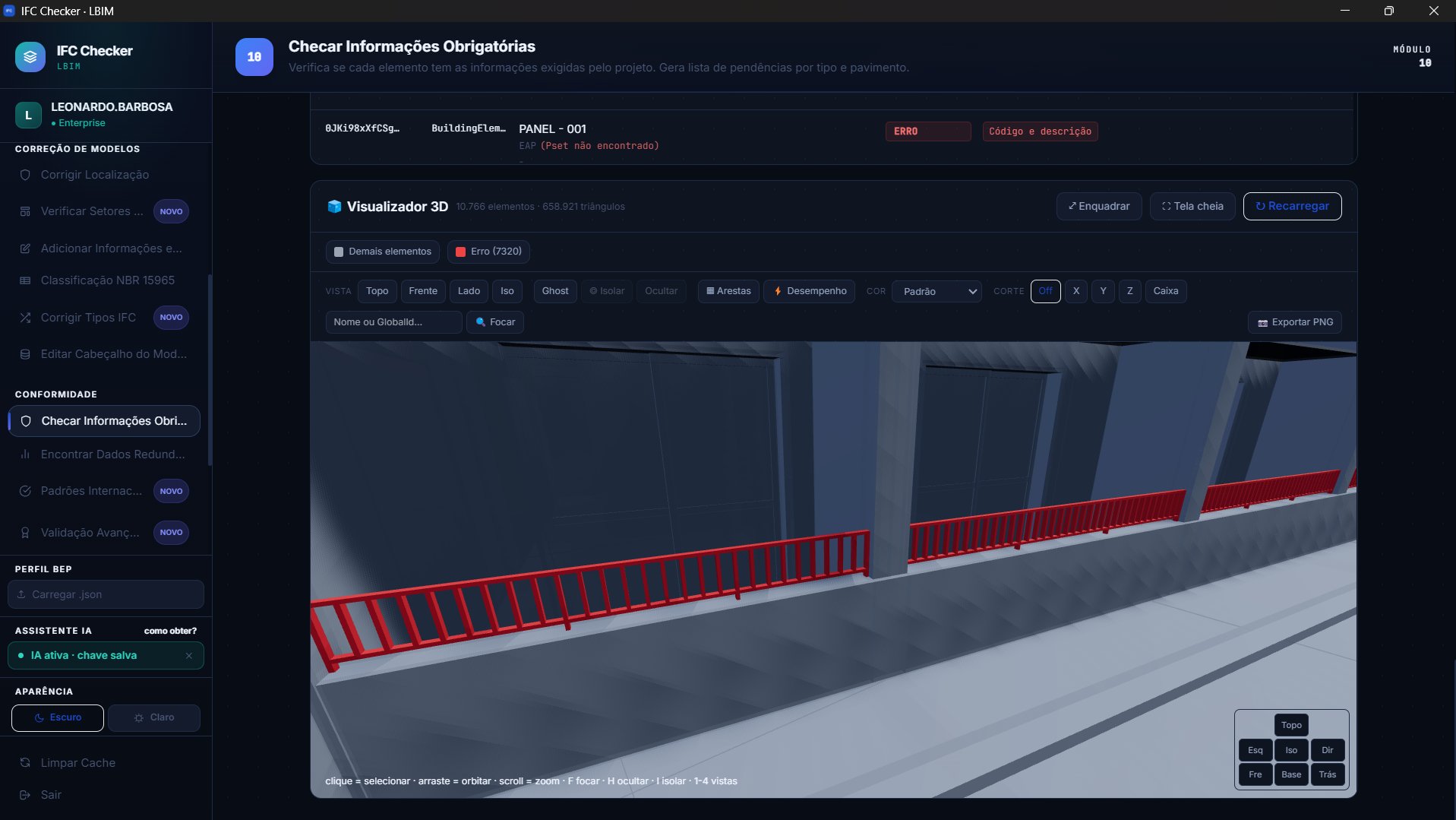
Model QA/QC in the IDS standard: rules per class, expected value, list, regex and filters. Open items per class and storey, ready to track.
Every module running locally in a Windows application, plus Federated Model: model federation with no size ceiling, geometry cache (the second load takes seconds), smart views by property, measurement that snaps to corners, walk mode, section box, mini-map, saved views, file colour as the default, and markups carrying the 2D floor plan of the storey and the 3D snapshot, sent straight to the Coordination Dashboard. Built for confidential projects, public works and teams with no patience for IT bureaucracy.
Files are read and processed on your own machine. Nothing is sent to any server, which suits sensitive data and public tenders.
Where audit tools stop at the report, IFC Checker edits the file: classes, Psets, coordinates, header, and saves a corrected IFC.
AI-written technical reports and automatic IFC class suggestions per family: hours of work reduced to one click.
No server, no IT project, no weeks of training, no licence that costs a salary. Install it, open the IFC and work.
The first accounts get every module unlocked, priority in the rollout queue and direct access to the founder during onboarding. Limited seats this week.
Fully web-based, nothing to install. No minimum commitment.
Audit, fix and prove the quality of the model, from the quick diagnosis to clash detection. Here you work the file; the portfolio of projects lives in the Coordinator Panel, from Pro up.
For whoever coordinates: every analysis becomes a project indicator, with a score per phase and discipline, deadlines against the schedule, CDE issues and a client panel with no login.
The plus is not having to set anything up: LBIM builds your BEP profile from the project's own BEP, and the Coordinator Panel tracks up to three projects.
For practices coordinating several projects at once, each one with its BEP profile set up by LBIM.
For developers, contractors and large practices: everything the platform does, with no cap on projects and the BEP profile of each one set up by LBIM. We put the proposal together from the number of users and the volume of analyses.
IFC Checker came out of our own modeling practice and the real pain of delivering BIM that has to survive an audit. That same team models your project.
LBIM delivers constructible, auditable BIM models across every discipline, from concept to as-built. We do not model for pretty renders: we model for the site to use, with structured information, coordination between disciplines and data ready for quantity takeoff and inspection.
Every delivery goes through the same scrutiny IFC Checker applies: valid schema, complete Psets, NBR 15965 classification and correct georeferencing. What you get is an IFC that survives any audit, including your client own.
We work with practices, developers and contractors in Brazil and Portugal, on site or remotely, matching the level of detail (LOD 100 to 500) and the pace to your contract and your BIM maturity.
SD, DD, CD and as-built, with scope and LOD agreed up front. You know exactly what you get at each stage, with no surprise at delivery.
Every model is validated in IFC Checker before it ships. The quality report travels with the delivery, with an SHA-256 hash for traceability.
Real experience on projects in both countries, with an NDA available for confidential work and direct contact with whoever coordinates your model.
IFC Checker access, the desktop edition or BIM modeling: tell us what you need and we will reply within one business day.
Answered within one business day.
Brazil & Portugal · remote and on site